FAQs
FREQUENTLY ASKED QUESTIONS:
- 1. I used the old LE portal. How can I get set up in this new MyLightedge Portal?
Welcome! Please follow the instructions on this page Legacy Account Migration.
- 2. How does I access the MyLightedge Portal?
Go to https://portal.mylightedge.com/ and login with your MyLightedge Portal account credentials. (SSO login not available.)
MFA is required for all MyLightedge accounts.
Note
Users must type in the One-Time Passcode (OTP) from the SMS message or from their authentication app.
- 3. I forgot my password.
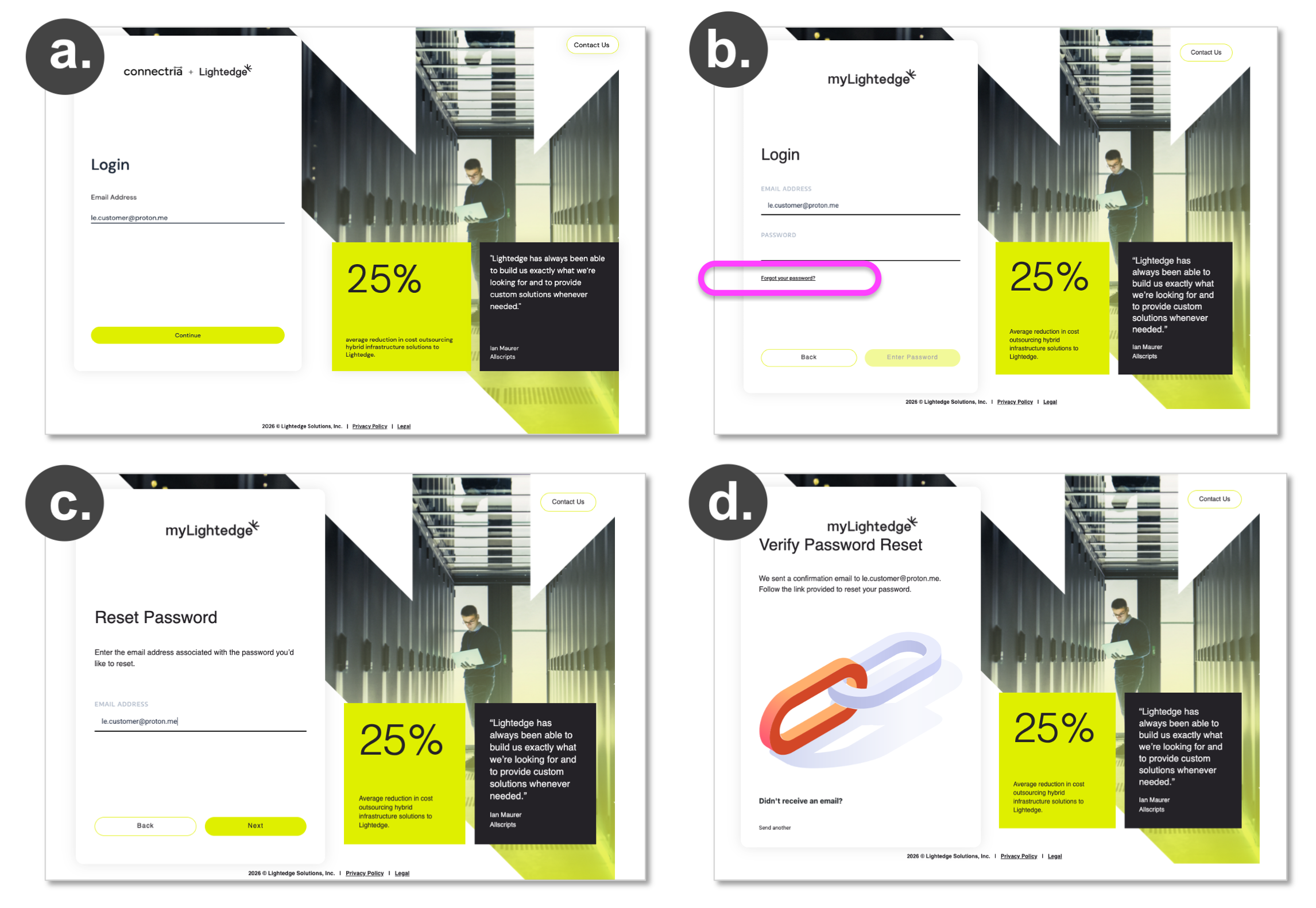
You can reset your password on your own. Go to https://portal.mylightedge.com/ enter your email address for your MyLightedge Portal account and click ‘Continue.’
On the Login page, click ‘Forgot Your Password’ and follow the prompts.
You will be asked to confirm the email address of your MyLightedge account
In the email you recieve, click on ‘RESET PASSWORD’ and a new tab will open where you can enter a new password.
- 4. I’m locked out of MyLightedge because my MFA isn’t working. What do I do?
Your Organizational Admin can reset your MFA from within their ‘Accounts & Settings’ –> ‘People’ page by clicking on your profile name.
You can contact tickets@lightedge.com or call 877-589-3654 and provide your company’s passphrase to get your MFA reset.
- 5. How can I change my password?
In the MyLightedge Portal, go to the left side navigation bar and select ‘Accounts & Settings’ –> ‘Profile’
On the ‘My profile’ page, click ‘Change password.’
Note
Your MyLightedge password must be at least 12 characters with 1 lowercase letter, 1 uppercase letter, 1 number, and 1 symbol
- 6. How can I change my MFA method?
In the MyLightedge Portal, go to the left side navigation bar and select ‘Accounts & Settings’ –> ‘Profile’
On the ‘My profile’ page, click ‘Expire MFA session.’
Note
MFA options are limited to SMS text (US numbers only) and authentication apps (e.g. Google Authenticator, Authy, Microsoft, DUO). Authentication by push notification or email is not available.
- 7. I know I have a MyLightedge Portal account, but when I try to login I see this error message, “There is no account associated with this Username/Email address. Contact Us.”
Confirm that you are entering the email address associated with your MyLightedge Portal account, and that there are no typos in your email address.
Ensure you have completed your onboarding before trying to login.
- 8. Why can’t I see all the pages in the MyLightedge Portal?
MyLightedge feature availability is dependent on a customer’s specific services, products, and user permissions.
- 9. How can I contact Lightedge Support to get help with an issue not referenced here?
Submit a ticket through the MyLightedge Portal
Email tickets@lightedge.com
Call +1 877-589-3654
- 10. Can I share a feature request or idea for the MyLightedge Portal?
We welcome your feedback! Please complete this anonymous customer survey: https://forms.cloud.microsoft/r/Pn1wfLNP9g